Animation prompts
Written By Kacper Staniul
Last updated 6 months ago
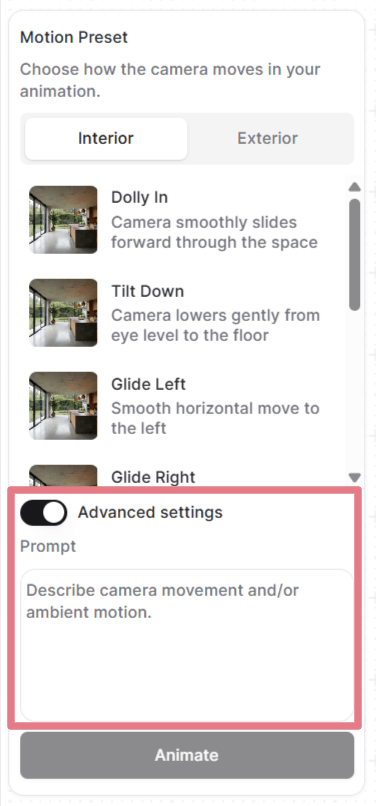
After setting your frames, you can either select a motion preset or write a custom prompt.
Open "Advanced settings" to see and customize the prompt each preset uses, or remove the prompt and write your own from scratch.
How prompts work in animations
Your uploaded image already defines the scene: the room, the lighting, the materials, everything visual. The prompt only needs to describe how the camera moves and how the environment behaves.
A good animation prompt has up to two parts:
[Camera movement] + [Ambient motion]
You don't need both every time. Camera movement alone is often enough. For static camera shots, describing the ambience is all you need.
Camera movement
Below are the common camera motions you can use in your custom prompts.
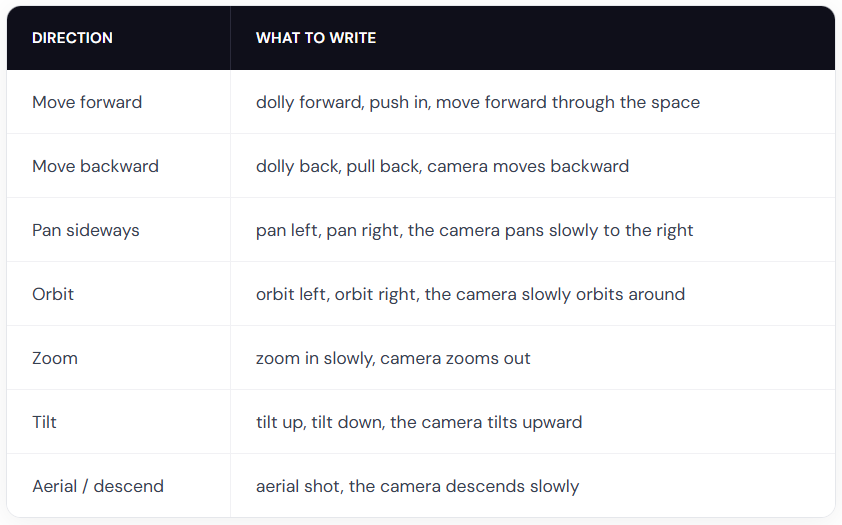
Pro tip: combine these with speed modifiers like slowly, gently, or gradually for smooth flythroughs. Use quickly or fast only if you want dramatic speed.
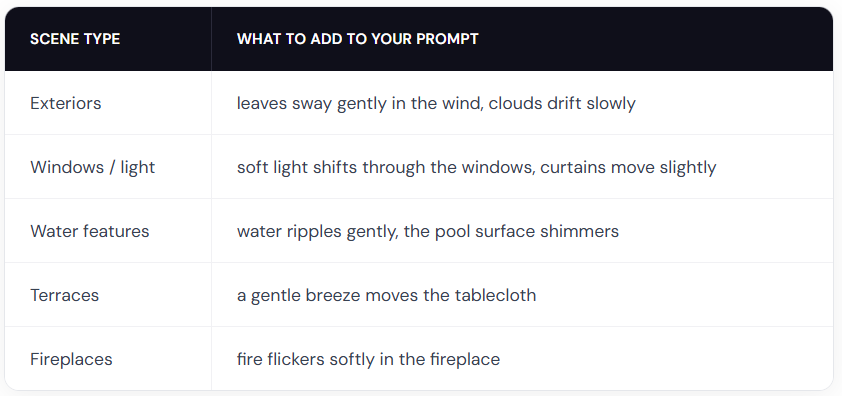
Ambient motion
Animation prompt examples
Use these prompts as starting points. Copy one, swap in your scene details, and adjust the camera direction.
Interiors
The camera slowly orbits left around the dining table, candlelight flickers softly
Slow zoom in on the kitchen countertop, warm light gently shifts across the surface
Gentle dolly forward, fire flickers in the fireplace, warm light softly shifts on the walls
Exteriors
The camera slowly orbits right around the building, soft clouds drift in the sky
The camera dollies forward along the garden path, leaves rustle gently in the breeze
The camera slowly rises from ground level, revealing the full elevation and mountains in the background
Landscapes
The camera slowly pans right across the garden, leaves sway gently in the breeze, day turns into night
Fixed camera, rain falls steadily on the terrace, water pools ripple gently
The camera pans left, gradually revealing the terrace and the landscape beyond
With people
Note: human movement is less predictable than camera-only or environmental prompts. You may need to generate a couple of times to get a clean result.
A man in a suit walks forward through the office corridor, the camera follows from behind
A woman walks into frame from the left and sits down on the sofa, the camera holds still
A woman leans on the balcony railing looking out at the view, her hair moves gently in the breeze
Two people sit at the dining table talking, gesturing naturally, the camera slowly pans right
Get creative
There are no limits to what you can create. Write a custom prompt describing any kind of animation you need.
Fixed camera. A closed carton box drops on the floor and explodes. The furniture smoothly comes out of the box and furnishes the room. (start and end frame needed)
Fixed camera. A crane slowly lowers the modular house to the ground. (start and end frame needed)
Thick, vivid oil paint erupts from the center and rushes outward in every direction, flooding the sketch with rich color. (use a black and white input)
Animations best practices
Describe motion, not the scene
Your image already shows the scene. Don't repeat what's visible.
Bad: Modern living room with white walls, wooden floor, large windows with natural light, the camera pans right
Good: The camera slowly pans right, revealing the ocean view behind the balcony windows
Use degree words for motion intensity
The AI can't infer speed or intensity from your image alone. Always mention it in your prompts.
Bad: The trees move
Good: The trees sway gently in the wind
Words like slowly, gently, quickly, strongly, and slightly make a big difference.
Don't use negative prompts
Saying what you don't want won't work. Always describe what you do want.
Bad: No camera shake, don't zoom in
Good: Steady, locked camera with no movement or The camera pans smoothly to the left
Keep it short
One to two sentences is the sweet spot. Focus on describing the camera motion and ambience.
Still need help? Ask the team