Prompty pro animace
Poslední aktualizace Před 8 dny
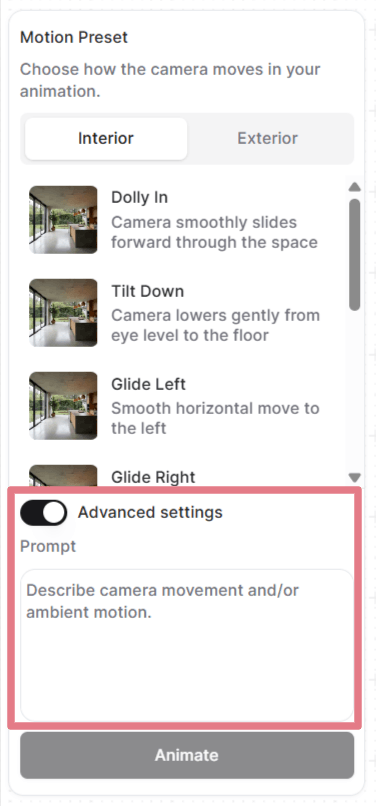
Jakmile nastavíte snímky, můžete vybrat předvolbu pohybu nebo napsat vlastní prompt.
Otevřete „Pokročilá nastavení", kde uvidíte a můžete upravit prompt, který každá předvolba používá, nebo prompt odstraňte a napište si vlastní od nuly.
Jak prompty fungují v animacích
Váš nahraný obrázek už scénu definuje: místnost, osvětlení, materiály, vše vizuální. Prompt musí popsat jen to, jak se pohybuje kamera a jak se chová prostředí.
Dobrý animační prompt má nejvýše dvě části:
[Camera movement] + [Ambient motion]
Nepotřebujete obě pokaždé. Často stačí samotný pohyb kamery. U záběrů se statickou kamerou stačí popsat atmosféru.
Pohyb kamery
Níže jsou běžné pohyby kamery, které můžete použít ve svých vlastních promptech.
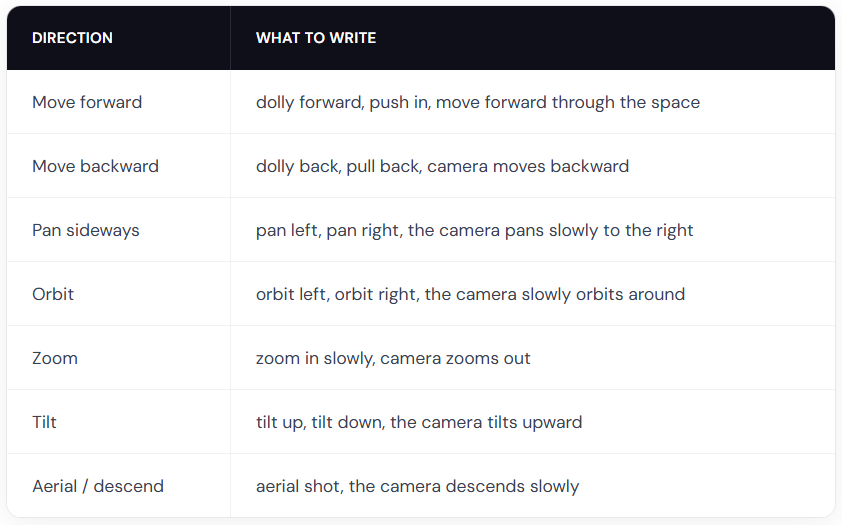
Tip: kombinujte je s modifikátory rychlosti, například slowly, gently, nebo gradually pro plynulé průlety. Slova quickly nebo fast používejte jen tehdy, když chcete dramatickou rychlost.
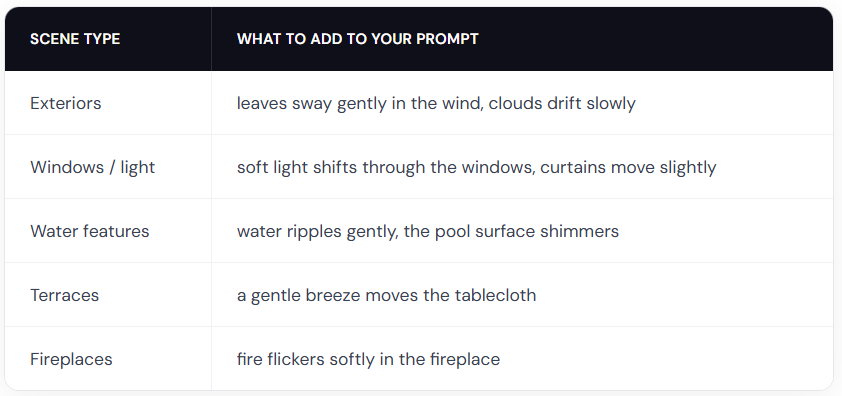
Pohyb prostředí
Příklady promptů pro animace
Použijte tyto prompty jako výchozí bod. Zkopírujte jeden, vyměňte detaily za svou scénu a upravte směr kamery.
Interiéry
The camera slowly orbits left around the dining table, candlelight flickers softly
Slow zoom in on the kitchen countertop, warm light gently shifts across the surface
Gentle dolly forward, fire flickers in the fireplace, warm light softly shifts on the walls
Exteriéry
The camera slowly orbits right around the building, soft clouds drift in the sky
The camera dollies forward along the garden path, leaves rustle gently in the breeze
The camera slowly rises from ground level, revealing the full elevation and mountains in the background
Krajiny
The camera slowly pans right across the garden, leaves sway gently in the breeze, day turns into night
Fixed camera, rain falls steadily on the terrace, water pools ripple gently
The camera pans left, gradually revealing the terrace and the landscape beyond
S lidmi
Poznámka: pohyb lidí je méně předvídatelný než prompty jen s kamerou nebo prostředím. Možná budete muset generovat několikrát, abyste dostali čistý výsledek.
A man in a suit walks forward through the office corridor, the camera follows from behind
A woman walks into frame from the left and sits down on the sofa, the camera holds still
A woman leans on the balcony railing looking out at the view, her hair moves gently in the breeze
Two people sit at the dining table talking, gesturing naturally, the camera slowly pans right
Buďte kreativní
Tomu, co můžete vytvořit, se meze nekladou. Napište vlastní prompt popisující jakoukoli animaci, kterou potřebujete.
Fixed camera. A closed carton box drops on the floor and explodes. The furniture smoothly comes out of the box and furnishes the room. (je potřeba počáteční a koncový snímek)
Fixed camera. A crane slowly lowers the modular house to the ground. (je potřeba počáteční a koncový snímek)
Thick, vivid oil paint erupts from the center and rushes outward in every direction, flooding the sketch with rich color. (použijte černobílý vstup)
Osvědčené postupy pro animace
Popisujte pohyb, ne scénu
Váš obrázek už scénu ukazuje. Neopakujte to, co je vidět.
Špatně: Modern living room with white walls, wooden floor, large windows with natural light, the camera pans right
Dobře: The camera slowly pans right, revealing the ocean view behind the balcony windows
Používejte slova vyjadřující intenzitu pohybu
AI nedokáže odvodit rychlost ani intenzitu jen z vašeho obrázku. Vždy ji ve svých promptech uveďte.
Špatně: The trees move
Dobře: The trees sway gently in the wind
Slova jako slowly, gently, quickly, strongly a slightly dělají velký rozdíl.
Nepoužívejte negativní prompty
Nefunguje to, když řeknete, co nechcete. Vždy popisujte, co chcete.
Špatně: No camera shake, don't zoom in
Dobře: Steady, locked camera with no movement or The camera pans smoothly to the left
Pište stručně
Jedna až dvě věty jsou ideální. Soustřeďte se na popis pohybu kamery a atmosféry.
Bylo to užitečné?
Stále potřebujete pomoc? Zeptejte se týmu