Prompt animasi
Pungkasan dianyari 8 days ago
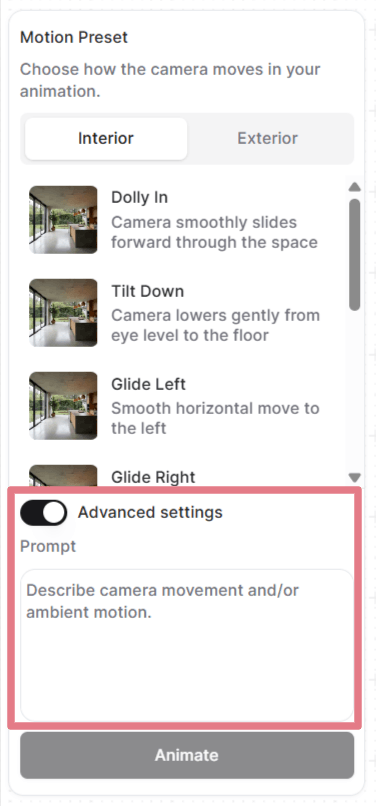
Sawisé nyetel pigura sampeyan, sampeyan bisa milih preset gerakan utawa nulis prompt khusus.
Bukaa "Pengaturan lanjutan (Advanced settings)" kanggo ndeleng lan nyetel prompt sing digunakaké saben preset, utawa busaken prompt banjur tulisen dhéwé saka nol.
Cara kerja prompt ing animasi
Gambar sing sampeyan unggah wis nemtokaké adegan: kamar, pencahyan, bahan, kabèh sing visual. Prompt mung perlu njlèntrèhaké kepriyé kamera obah lan kepriyé lingkungan tumindak.
Prompt animasi sing apik duwé nganti rong bagéan:
[Camera movement] + [Ambient motion]
Sampeyan ora perlu loro-lorone saben-saben. Gerakan kamera wae asring wis cukup. Kanggo bidikan kamera statis, njlèntrèhaké swasana wae wis cukup.
Gerakan kamera
Iki gerakan kamera umum sing bisa sampeyan gunakaké ing prompt khusus sampeyan.
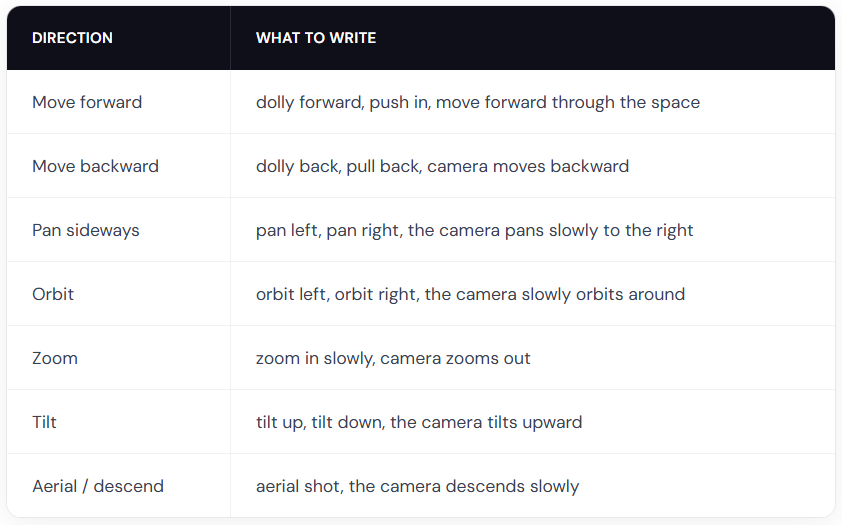
Tips saka ahli: gabungna iki karo pengubah kacepetan kayata slowly, gently, utawa gradually kanggo flythrough sing mulus. Gunakna quickly utawa fast mung yen sampeyan péngin kacepetan sing dramatis.
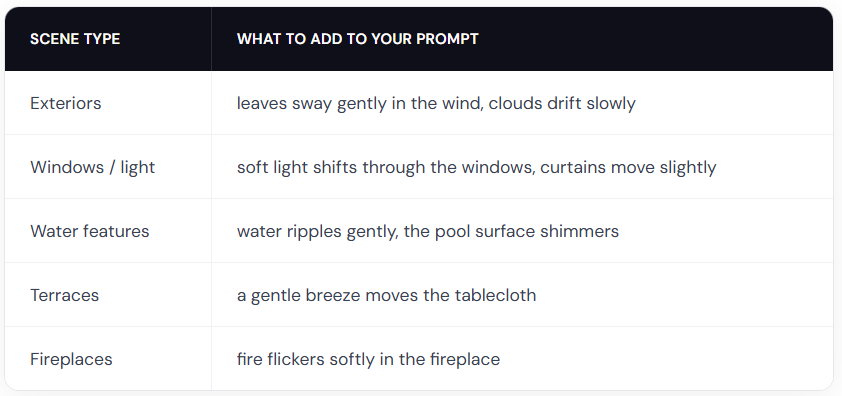
Gerakan lingkungan
Conto prompt animasi
Gunakna prompt iki minangka titik wiwitan. Salinen siji, ganti karo rincian adegan sampeyan, lan setèl arah kamera.
Interior
The camera slowly orbits left around the dining table, candlelight flickers softly
Slow zoom in on the kitchen countertop, warm light gently shifts across the surface
Gentle dolly forward, fire flickers in the fireplace, warm light softly shifts on the walls
Eksterior
The camera slowly orbits right around the building, soft clouds drift in the sky
The camera dollies forward along the garden path, leaves rustle gently in the breeze
The camera slowly rises from ground level, revealing the full elevation and mountains in the background
Lanskap
The camera slowly pans right across the garden, leaves sway gently in the breeze, day turns into night
Fixed camera, rain falls steadily on the terrace, water pools ripple gently
The camera pans left, gradually revealing the terrace and the landscape beyond
Nganggo wong
Cathetan: obahé manungsa luwih angel diramalaké tinimbang prompt kamera wae utawa lingkungan wae. Sampeyan bisa uga kudu nggawé sawetara kaping supaya entuk asil sing resik.
A man in a suit walks forward through the office corridor, the camera follows from behind
A woman walks into frame from the left and sits down on the sofa, the camera holds still
A woman leans on the balcony railing looking out at the view, her hair moves gently in the breeze
Two people sit at the dining table talking, gesturing naturally, the camera slowly pans right
Dadi kreatif
Ora ana watesan apa sing bisa sampeyan gawé. Tulisen prompt khusus sing njlèntrèhaké animasi apa waé sing sampeyan butuhaké.
Fixed camera. A closed carton box drops on the floor and explodes. The furniture smoothly comes out of the box and furnishes the room. (butuh pigura wiwitan lan pungkasan)
Fixed camera. A crane slowly lowers the modular house to the ground. (butuh pigura wiwitan lan pungkasan)
Thick, vivid oil paint erupts from the center and rushes outward in every direction, flooding the sketch with rich color. (gunakna input ireng putih)
Praktik paling apik kanggo animasi
Njlèntrèhna gerakan, dudu adegan
Gambar sampeyan wis nuduhaké adegan. Aja ngolang apa sing wis katon.
Elek: Modern living room with white walls, wooden floor, large windows with natural light, the camera pans right
Apik: The camera slowly pans right, revealing the ocean view behind the balcony windows
Gunakna tembung tingkat kanggo intensitas gerakan
AI ora bisa nyimpulaké kacepetan utawa intensitas saka gambar sampeyan wae. Tansah sebutna ing prompt sampeyan.
Elek: The trees move
Apik: The trees sway gently in the wind
Tembung kayata slowly, gently, quickly, strongly, lan slightly nggawé bedané gedhé.
Aja nggunakaké prompt negatif
Nyebutaké apa sing ora sampeyan karepaké ora bakal mbiyantu. Tansah njlèntrèhna apa sing sampeyan karepaké.
Elek: No camera shake, don't zoom in
Apik: Steady, locked camera with no movement or The camera pans smoothly to the left
Gawé ringkes
Siji nganti rong ukara iku paling pas. Fokusaké ing njlèntrèhaké gerakan kamera lan swasana.
Apa iki mbiyantu?
Isih butuh pitulungan? Takon tim