एनिमेसन प्रम्प्टहरू
अन्तिम अपडेट 8 days ago
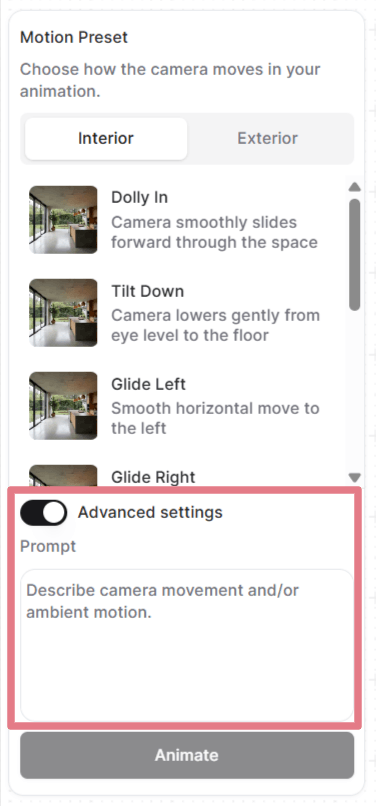
आफ्ना फ्रेम सेट गरेपछि, तपाईं कुनै मोसन प्रिसेट छान्न वा कस्टम प्रम्प्ट लेख्न सक्नुहुन्छ।
"उन्नत सेटिङहरू (Advanced settings)" खोलेर हरेक प्रिसेटले प्रयोग गर्ने प्रम्प्ट हेर्नुहोस् र कस्टमाइज गर्नुहोस्, वा प्रम्प्ट हटाएर आफ्नै प्रम्प्ट सुरुदेखि लेख्नुहोस्।
एनिमेसनमा प्रम्प्टले कसरी काम गर्छ
तपाईंले अपलोड गरेको इमेजले सिन पहिल्यै तय गरिसकेको हुन्छ: कोठा, लाइटिङ, सामग्री, हरेक दृश्यात्मक कुरा। प्रम्प्टले क्यामेरा कसरी चल्छ र वातावरण कसरी व्यवहार गर्छ भन्ने कुरा मात्र वर्णन गर्नुपर्छ।
राम्रो एनिमेसन प्रम्प्टमा बढीमा दुई भाग हुन्छन्:
[Camera movement] + [Ambient motion]
हरेक पटक दुवै चाहिँदैन। प्रायः क्यामेरा मुभमेन्ट मात्र पर्याप्त हुन्छ। स्थिर क्यामेरा सटका लागि वातावरणको वर्णन मात्र चाहिन्छ।
क्यामेरा मुभमेन्ट
तल सामान्य क्यामेरा मुभमेन्टहरू दिइएका छन् जसलाई तपाईं आफ्ना कस्टम प्रम्प्टमा प्रयोग गर्न सक्नुहुन्छ।
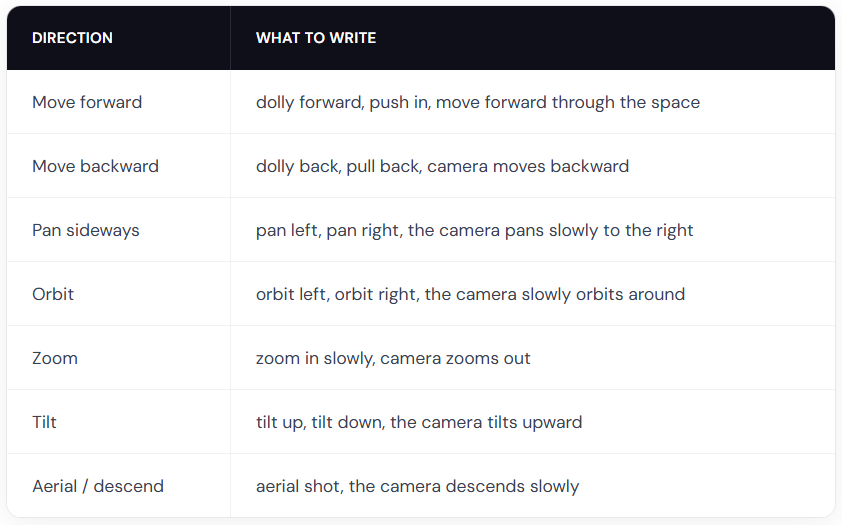
प्रो टिप: यिनलाई स्पिड मोडिफायरसँग मिलाउनुहोस्, जस्तै slowly, gently, वा gradually स्मूथ फ्लाइथ्रूका लागि। नाटकीय गति चाहिएमा मात्र quickly वा fast प्रयोग गर्नुहोस्।
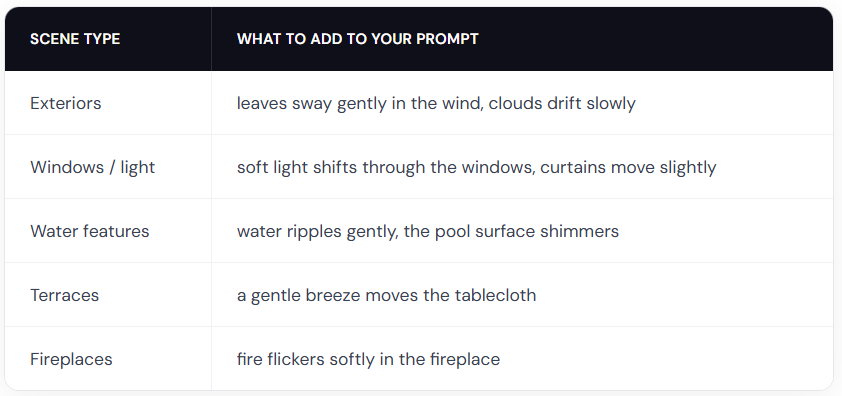
वातावरणको गति
एनिमेसन प्रम्प्टका उदाहरणहरू
यी प्रम्प्टहरूलाई सुरुवाती बिन्दुका रूपमा प्रयोग गर्नुहोस्। एउटा कपी गर्नुहोस्, त्यसमा आफ्नो सिनको विवरण हाल्नुहोस् र क्यामेराको दिशा मिलाउनुहोस्।
इन्टेरियर
The camera slowly orbits left around the dining table, candlelight flickers softly
Slow zoom in on the kitchen countertop, warm light gently shifts across the surface
Gentle dolly forward, fire flickers in the fireplace, warm light softly shifts on the walls
एक्स्टेरियर
The camera slowly orbits right around the building, soft clouds drift in the sky
The camera dollies forward along the garden path, leaves rustle gently in the breeze
The camera slowly rises from ground level, revealing the full elevation and mountains in the background
ल्यान्डस्केप
The camera slowly pans right across the garden, leaves sway gently in the breeze, day turns into night
Fixed camera, rain falls steadily on the terrace, water pools ripple gently
The camera pans left, gradually revealing the terrace and the landscape beyond
मानिसहरूसहित
नोट: मानिसको चाल केवल क्यामेरा वा केवल वातावरणका प्रम्प्टभन्दा कम अनुमानयोग्य हुन्छ। सफा नतिजा पाउन तपाईंले एकदुई पटक जेनेरेट गर्नुपर्ने हुन सक्छ।
A man in a suit walks forward through the office corridor, the camera follows from behind
A woman walks into frame from the left and sits down on the sofa, the camera holds still
A woman leans on the balcony railing looking out at the view, her hair moves gently in the breeze
Two people sit at the dining table talking, gesturing naturally, the camera slowly pans right
सिर्जनशील बन्नुहोस्
तपाईंले के बनाउन सक्नुहुन्छ भन्नेमा कुनै सीमा छैन। तपाईंलाई चाहिने जुनसुकै प्रकारको एनिमेसनको वर्णन गर्ने कस्टम प्रम्प्ट लेख्नुहोस्।
Fixed camera. A closed carton box drops on the floor and explodes. The furniture smoothly comes out of the box and furnishes the room. (स्टार्ट र एन्ड फ्रेम चाहिन्छ)
Fixed camera. A crane slowly lowers the modular house to the ground. (स्टार्ट र एन्ड फ्रेम चाहिन्छ)
Thick, vivid oil paint erupts from the center and rushes outward in every direction, flooding the sketch with rich color. (कालोसेतो इनपुट प्रयोग गर्नुहोस्)
एनिमेसनका उत्कृष्ट अभ्यासहरू
सिनको होइन, गतिको वर्णन गर्नुहोस्
तपाईंको इमेजले सिन पहिल्यै देखाइसकेको छ। जे देखिन्छ त्यसलाई दोहोर्याउनुहुन्न।
खराब: Modern living room with white walls, wooden floor, large windows with natural light, the camera pans right
राम्रो: The camera slowly pans right, revealing the ocean view behind the balcony windows
गतिको तीव्रताका लागि मात्रा बुझाउने शब्द प्रयोग गर्नुहोस्
AI ले तपाईंको इमेजबाट मात्र गति वा तीव्रता अनुमान गर्न सक्दैन। यसलाई सधैँ आफ्ना प्रम्प्टमा उल्लेख गर्नुहोस्।
खराब: The trees move
राम्रो: The trees sway gently in the wind
slowly, gently, quickly, strongly, र slightly जस्ता शब्दले ठूलो फरक पार्छन्।
नेगेटिभ प्रम्प्ट प्रयोग नगर्नुहोस्
तपाईंले नचाहेको कुरा भन्नाले काम गर्दैन। सधैँ आफूले के चाहनुहुन्छ भन्ने कुरा वर्णन गर्नुहोस्।
खराब: No camera shake, don't zoom in
राम्रो: Steady, locked camera with no movement or The camera pans smoothly to the left
छोटो राख्नुहोस्
एकदेखि दुई वाक्य सबैभन्दा उपयुक्त हुन्छ। क्यामेरा मुभमेन्ट र वातावरणको वर्णन गर्नमा ध्यान दिनुहोस्।
के यो उपयोगी थियो?
अझै मद्दत चाहिन्छ? टिमलाई सोध्नुहोस्