Prompty pre animácie
Posledná aktualizácia Pred 8 dňami
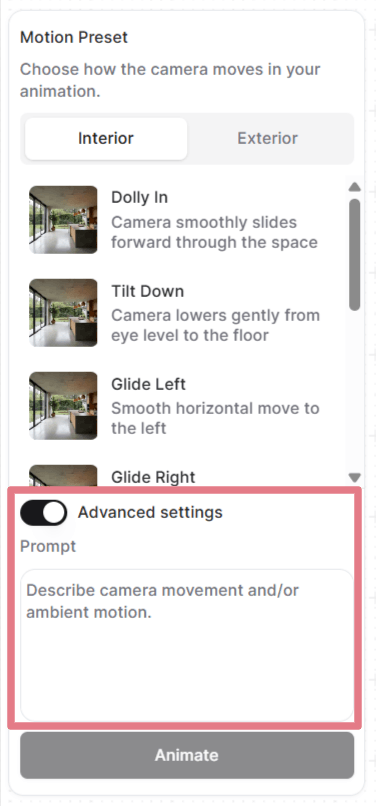
Keď nastavíte snímky, môžete vybrať predvoľbu pohybu alebo napísať vlastný prompt.
Otvorte „Rozšírené nastavenia", kde uvidíte a môžete upraviť prompt, ktorý každá predvoľba používa, alebo prompt odstráňte a napíšte si vlastný od nuly.
Ako prompty fungujú v animáciách
Váš nahraný obrázok už scénu definuje: miestnosť, osvetlenie, materiály, všetko vizuálne. Prompt musí opísať len to, ako sa pohybuje kamera a ako sa správa prostredie.
Dobrý animačný prompt má najviac dve časti:
[Camera movement] + [Ambient motion]
Nepotrebujete obe zakaždým. Často stačí samotný pohyb kamery. Pri záberoch so statickou kamerou stačí opísať atmosféru.
Pohyb kamery
Nižšie sú bežné pohyby kamery, ktoré môžete použiť vo svojich vlastných promptoch.
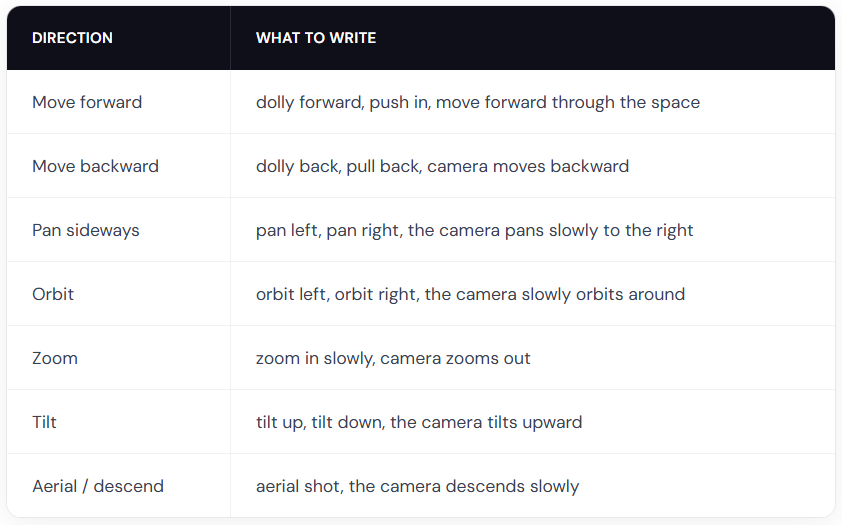
Tip: kombinujte ich s modifikátormi rýchlosti, napríklad slowly, gently, alebo gradually pre plynulé prelety. Slová quickly alebo fast používajte len vtedy, keď chcete dramatickú rýchlosť.
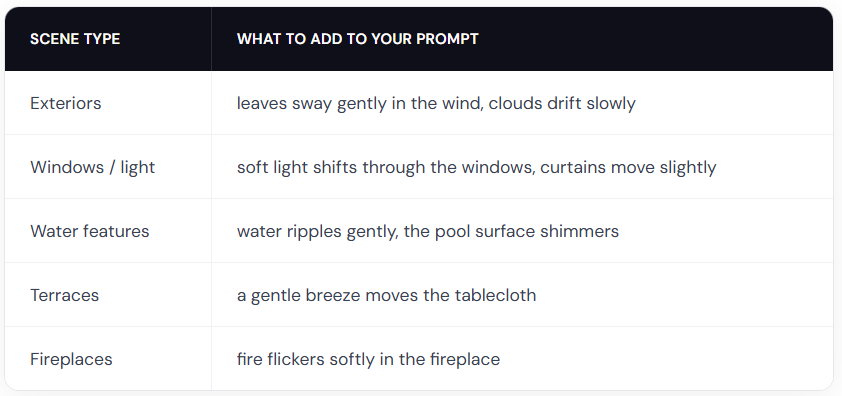
Pohyb prostredia
Príklady promptov pre animácie
Použite tieto prompty ako východiskový bod. Skopírujte jeden, vymeňte detaily za svoju scénu a upravte smer kamery.
Interiéry
The camera slowly orbits left around the dining table, candlelight flickers softly
Slow zoom in on the kitchen countertop, warm light gently shifts across the surface
Gentle dolly forward, fire flickers in the fireplace, warm light softly shifts on the walls
Exteriéry
The camera slowly orbits right around the building, soft clouds drift in the sky
The camera dollies forward along the garden path, leaves rustle gently in the breeze
The camera slowly rises from ground level, revealing the full elevation and mountains in the background
Krajiny
The camera slowly pans right across the garden, leaves sway gently in the breeze, day turns into night
Fixed camera, rain falls steadily on the terrace, water pools ripple gently
The camera pans left, gradually revealing the terrace and the landscape beyond
S ľuďmi
Poznámka: pohyb ľudí je menej predvídateľný než prompty len s kamerou alebo prostredím. Možno budete musieť generovať niekoľkokrát, aby ste dostali čistý výsledok.
A man in a suit walks forward through the office corridor, the camera follows from behind
A woman walks into frame from the left and sits down on the sofa, the camera holds still
A woman leans on the balcony railing looking out at the view, her hair moves gently in the breeze
Two people sit at the dining table talking, gesturing naturally, the camera slowly pans right
Buďte kreatívni
Tomu, čo môžete vytvoriť, sa medze nekladú. Napíšte vlastný prompt opisujúci akúkoľvek animáciu, ktorú potrebujete.
Fixed camera. A closed carton box drops on the floor and explodes. The furniture smoothly comes out of the box and furnishes the room. (je potrebný počiatočný a koncový snímok)
Fixed camera. A crane slowly lowers the modular house to the ground. (je potrebný počiatočný a koncový snímok)
Thick, vivid oil paint erupts from the center and rushes outward in every direction, flooding the sketch with rich color. (použite čiernobiely vstup)
Osvedčené postupy pre animácie
Opisujte pohyb, nie scénu
Váš obrázok už scénu ukazuje. Neopakujte to, čo je vidieť.
Zle: Modern living room with white walls, wooden floor, large windows with natural light, the camera pans right
Dobre: The camera slowly pans right, revealing the ocean view behind the balcony windows
Používajte slová vyjadrujúce intenzitu pohybu
AI nedokáže odvodiť rýchlosť ani intenzitu len z vášho obrázka. Vždy ju vo svojich promptoch uveďte.
Zle: The trees move
Dobre: The trees sway gently in the wind
Slová ako slowly, gently, quickly, strongly a slightly robia veľký rozdiel.
Nepoužívajte negatívne prompty
Nefunguje to, keď poviete, čo nechcete. Vždy opisujte, čo chcete.
Zle: No camera shake, don't zoom in
Dobre: Steady, locked camera with no movement or The camera pans smoothly to the left
Píšte stručne
Jedna až dve vety sú ideálne. Sústreďte sa na opis pohybu kamery a atmosféry.
Bolo to užitočné?
Stále potrebujete pomoc? Opýtajte sa tímu