एनिमेशन प्रॉम्प्ट
अंतिम अपडेट ८ दिन पहले
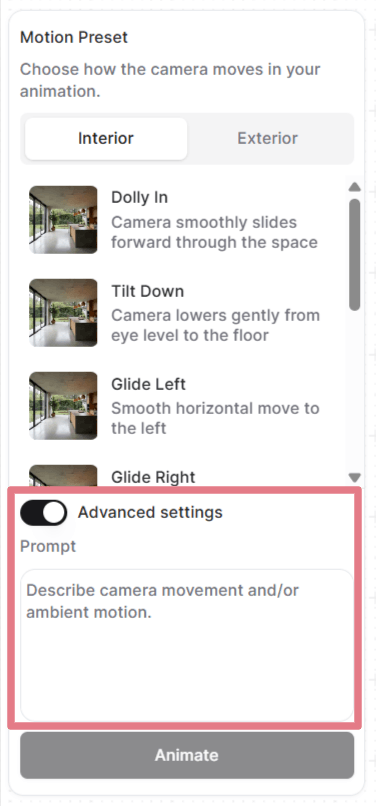
अपने फ़्रेम सेट करने के बाद, आप कोई मोशन प्रीसेट चुन सकते हैं या कस्टम प्रॉम्प्ट लिख सकते हैं।
"उन्नत सेटिंग्स (Advanced settings)" खोलकर देखें और कस्टमाइज़ करें कि हर प्रीसेट कौन सा प्रॉम्प्ट इस्तेमाल करता है, या प्रॉम्प्ट हटाकर अपना प्रॉम्प्ट शुरू से लिखें।
एनिमेशन में प्रॉम्प्ट कैसे काम करते हैं
आपकी अपलोड की हुई इमेज पहले से ही सीन तय कर देती है: कमरा, लाइटिंग, मटीरियल, हर विज़ुअल चीज़। प्रॉम्प्ट को सिर्फ़ यह बताना होता है कि कैमरा कैसे चलता है और माहौल कैसा व्यवहार करता है।
एक अच्छे एनिमेशन प्रॉम्प्ट में अधिकतम दो हिस्से होते हैं:
[Camera movement] + [Ambient motion]
हर बार दोनों की ज़रूरत नहीं होती। अक्सर अकेला कैमरा मूवमेंट ही काफ़ी होता है। स्थिर कैमरा शॉट के लिए सिर्फ़ माहौल का वर्णन ही चाहिए।
कैमरा मूवमेंट
नीचे आम कैमरा मूवमेंट दिए गए हैं जिन्हें आप अपने कस्टम प्रॉम्प्ट में इस्तेमाल कर सकते हैं।
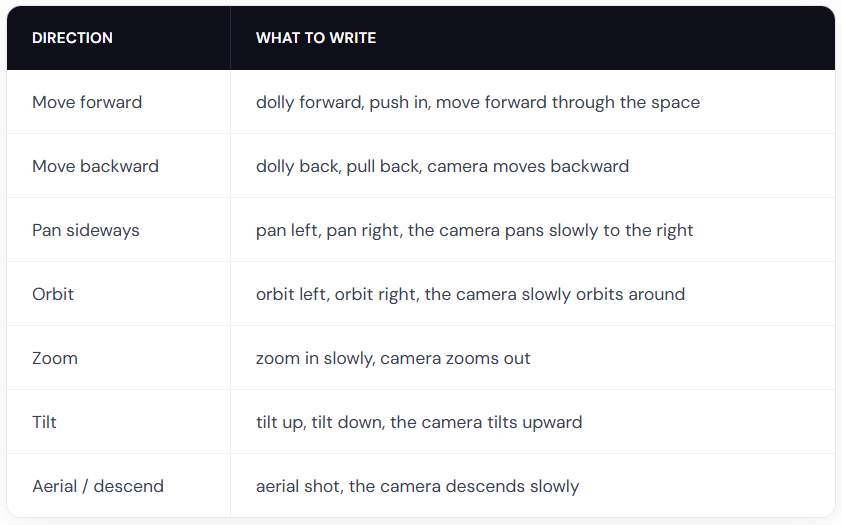
प्रो टिप: इन्हें स्पीड मॉडिफ़ायर के साथ मिलाएं, जैसे slowly, gently, या gradually स्मूद फ़्लाईथ्रू के लिए। नाटकीय रफ़्तार चाहिए तभी quickly या fast इस्तेमाल करें।
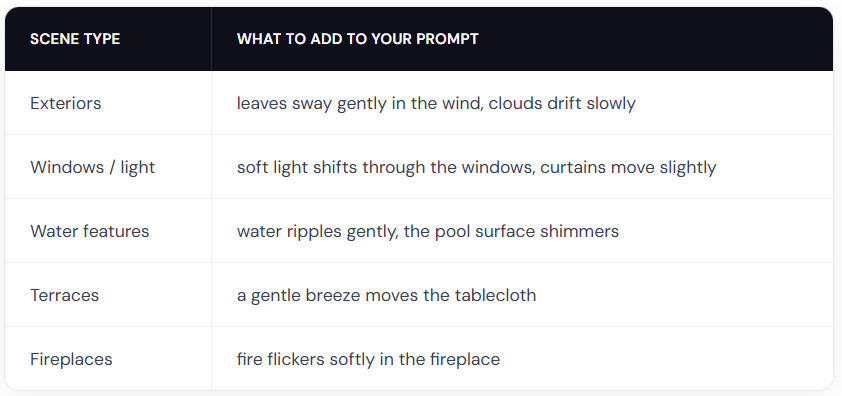
परिवेश की गति
एनिमेशन प्रॉम्प्ट के उदाहरण
इन प्रॉम्प्ट को शुरुआती बिंदु की तरह इस्तेमाल करें। एक कॉपी करें, उसमें अपने सीन का ब्यौरा डालें और कैमरे की दिशा एडजस्ट करें।
इंटीरियर
The camera slowly orbits left around the dining table, candlelight flickers softly
Slow zoom in on the kitchen countertop, warm light gently shifts across the surface
Gentle dolly forward, fire flickers in the fireplace, warm light softly shifts on the walls
एक्सटीरियर
The camera slowly orbits right around the building, soft clouds drift in the sky
The camera dollies forward along the garden path, leaves rustle gently in the breeze
The camera slowly rises from ground level, revealing the full elevation and mountains in the background
लैंडस्केप
The camera slowly pans right across the garden, leaves sway gently in the breeze, day turns into night
Fixed camera, rain falls steadily on the terrace, water pools ripple gently
The camera pans left, gradually revealing the terrace and the landscape beyond
लोगों के साथ
ध्यान दें: इंसानों की हरकत सिर्फ़ कैमरा या सिर्फ़ माहौल वाले प्रॉम्प्ट की तुलना में कम अनुमानित होती है। साफ़ नतीजा पाने के लिए आपको एक-दो बार जनरेट करना पड़ सकता है।
A man in a suit walks forward through the office corridor, the camera follows from behind
A woman walks into frame from the left and sits down on the sofa, the camera holds still
A woman leans on the balcony railing looking out at the view, her hair moves gently in the breeze
Two people sit at the dining table talking, gesturing naturally, the camera slowly pans right
रचनात्मक बनें
आप क्या बना सकते हैं, इसकी कोई सीमा नहीं है। जिस भी तरह का एनिमेशन आपको चाहिए, उसका वर्णन करने वाला कस्टम प्रॉम्प्ट लिखें।
Fixed camera. A closed carton box drops on the floor and explodes. The furniture smoothly comes out of the box and furnishes the room. (स्टार्ट और एंड फ़्रेम ज़रूरी हैं)
Fixed camera. A crane slowly lowers the modular house to the ground. (स्टार्ट और एंड फ़्रेम ज़रूरी हैं)
Thick, vivid oil paint erupts from the center and rushes outward in every direction, flooding the sketch with rich color. (ब्लैक एंड व्हाइट इनपुट इस्तेमाल करें)
एनिमेशन के सर्वोत्तम तरीके
सीन नहीं, गति का वर्णन करें
आपकी इमेज पहले से सीन दिखाती है। जो दिख रहा है उसे दोहराएं नहीं।
बुरा: Modern living room with white walls, wooden floor, large windows with natural light, the camera pans right
अच्छा: The camera slowly pans right, revealing the ocean view behind the balcony windows
गति की तीव्रता के लिए डिग्री वाले शब्द इस्तेमाल करें
AI सिर्फ़ आपकी इमेज से रफ़्तार या तीव्रता का अंदाज़ा नहीं लगा सकता। इसे हमेशा अपने प्रॉम्प्ट में बताएं।
बुरा: The trees move
अच्छा: The trees sway gently in the wind
slowly, gently, quickly, strongly, और slightly जैसे शब्द बहुत बड़ा फ़र्क़ डालते हैं।
नेगेटिव प्रॉम्प्ट इस्तेमाल न करें
जो आप नहीं चाहते, उसे बताने से काम नहीं चलता। हमेशा यह बताएं कि आप क्या चाहते हैं।
बुरा: No camera shake, don't zoom in
अच्छा: Steady, locked camera with no movement or The camera pans smoothly to the left
इसे छोटा रखें
एक से दो वाक्य सबसे सही रहते हैं। कैमरा मूवमेंट और माहौल का वर्णन करने पर ध्यान दें।
क्या यह सहायक था?
अभी भी मदद चाहिए? टीम से पूछें